

ig.KnockoutDataSource
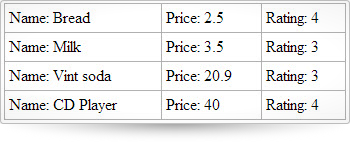
KnockoutDataSource は DataSource クラスを拡張しており、Ignite UI コントロールとプレーンな DOM 要素の両方に対する Knockout.js サポートを追加するクライアント側のコンポーネントです。KnockoutDataSource によって、行を追加、更新、削除するためにバインディングを作成することにより、ページのモデルとビューを同期することが可能となります。また、データ バインディング (データの読み取り) は完全に透過的です。つまり、監視可能な配列をデータ ストアとして使用でき、余分なコードを必要とせずに knockout.js とシームレスに動作します。行の配列と個々のセルは両方とも監視可能なオブジェクトとして設定できます。このデータソース機能は、フィルター、ページング、並べ替え、列の集計およびデータの更新をサポートします。この API のクラス、オプション、イベント、メソッドおよびテーマに関する詳細は、上記の関連するタブを参照してください。
コード サンプル
        <!doctype html>
        <html>
        <head>
            <!-- jQuery Core -->
            <script src="js/jquery.js" type="text/javascript"></script>
            <!-- jQuery UI -->
            <script src="js/jquery-ui.js" type="text/javascript"></script>
            <!-- Infragistics Loader Script -->
            <script src="js/infragistics.loader.js" type="text/javascript"></script>
            <script src="js/adventureWorks.min.js" type="text/javascript"></script>
            <!-- Infragistics Loader Initialization -->
            <script type="text/javascript">
		        var itemsModel,
		        db = [{"Name": "Bread","Rating": 4,"Price": "2.5"},
		              {"Name": "Milk", "Rating": 3, "Price": "3.5"},
			        {"Name": "Vint soda", "Rating": 3, "Price": "20.9"}];
		        function Item(name, price, rating) {
		            return {
		                name: ko.observable(name),
		                price: ko.observable(price),
		                rating: ko.observable(rating)
		            };
		        };
		        function ItemsViewModel() {
		                var self = this;
		                self.data = ko.observableArray([ ]);
		                for (var i = 0; i < 3; i++) {
		                    self.data.push(new Item(db[i].Name, db[i].Price, db[i].Rating));
		                }
		        }
		        var ds, render = function (success, error) {
			        if (success) {
				        ds.addRow(4, {name : "CD Player", price : "40", rating : 4}, true);
				         $($.ig.tmpl("<tr><td>Name: ${name}</td><td>Price: ${price}</td><td>Rating: ${rating}</td></tr>", ds.dataView())).appendTo("#table1");

			        } else {
				        alert(error);
			        }
		        }
		        $.ig.loader(function () {
		        var model = new ItemsViewModel();
		        ko.applyBindings(model);
			        ds = new $.ig.KnockoutDataSource({
				        callback: render,
				        dataSource: model,
				        type: 'json',
				        responseDataKey: 'data'
			        });
			        ds.dataBind();
		        });
	        </script>
            </head>
        <body>
            <table id="table1"></table>
        </body>
        </html>
依存関係
jquery-1.9.1.js
ig.util.js
ig.datasource.js
このコントロールにオプションはありません。
このコントロールにイベントはありません。
-
ig.KnockoutDataSource
コンストラクター- new $.ig.KnockoutDataSource( options:object );
- options
- タイプ:object
コード サンプル
var itemsModel, db = [{"Name": "Bread","Rating": 4,"Price": "2.5"}, {"Name": "Milk", "Rating": 3, "Price": "3.5"}, {"Name": "Vint soda", "Rating": 3, "Price": "20.9"}]; function Item(name, price, rating) { return { name: ko.observable(name), price: ko.observable(price), rating: ko.observable(rating) }; }; function ItemsViewModel() { var self = this; self.data = ko.observableArray([ ]); for (var i = 0; i < 3; i++) { self.data.push(new Item(db[i].Name, db[i].Price, db[i].Rating)); } } var ds, render = function (success, error) { if (success) { $($.ig.tmpl("<tr><td>Name: ${name}</td><td>Price: ${Price}</td><td>Rating: ${Rating}</td></tr>", ds.dataView())).appendTo("#table1"); } else { alert(error); } } $.ig.loader(function () { var model = new ItemsViewModel(); ko.applyBindings(model); ds = new $.ig.KnockoutDataSource({ callback: render, dataSource: model, type: 'json', responseDataKey: 'data' }); ds.dataBind(); }); -
addRow
- .addRow( rowId:object, rowObject:object, autoCommit:object );
データ ソースに新しい行を追加します。コミットまたはロール バックできるトランザクションを作成します。
- rowId
- タイプ:object
- rowObject
- タイプ:object
- autoCommit
- タイプ:object
コード サンプル
var itemsModel, db = [{"Name": "Bread","Rating": 4,"Price": "2.5"}, {"Name": "Milk", "Rating": 3, "Price": "3.5"}, {"Name": "Vint soda", "Rating": 3, "Price": "20.9"}]; function Item(name, price, rating) { return { name: ko.observable(name), price: ko.observable(price), rating: ko.observable(rating) }; }; function ItemsViewModel() { var self = this; self.data = ko.observableArray([ ]); for (var i = 0; i < 3; i++) { self.data.push(new Item(db[i].Name, db[i].Price, db[i].Rating)); } } var ds, render = function (success, error) { if (success) { //$("#table1 tbody").empty(); ds.addRow(4, {name : "CD Player", price : "40", rating : 4}, true); $($.ig.tmpl("<tr><td>Name: ${name}</td><td>Price: ${Price}</td><td>Rating: ${Rating}</td></tr>", ds.dataView())).appendTo("#table1"); } else { alert(error); } } $.ig.loader(function () { var model = new ItemsViewModel(); ko.applyBindings(model); ds = new $.ig.KnockoutDataSource({ callback: render, dataSource: model, type: 'json', responseDataKey: 'data' }); ds.dataBind(); }); -
dataAt
- .dataAt( path:string, keyspath:object );
階層データを ID パスおよびレイアウトに基づいて検索します。関連するレイアウトから子のデータを返します。
- path
- タイプ:string
- path - 展開されたレコードのキーを "pk:value" 形式でリストする文字列。"ID:0/ID:1" などの指定された pathSeparator で区切られます。
- keyspath
- タイプ:object
- keyspath - "Layout1/Layout2" など、親レイアウト階層をリストする文字列。
-
deleteRow
- .deleteRow( rowId:object, autoCommit:object );
データ ソースから行を削除します。
- rowId
- タイプ:object
- autoCommit
- タイプ:object
コード サンプル
var itemsModel, db = [{"Name": "Bread","Rating": 4,"Price": "2.5"}, {"Name": "Milk", "Rating": 3, "Price": "3.5"}, {"Name": "Vint soda", "Rating": 3, "Price": "20.9"}]; function Item(name, price, rating) { return { name: ko.observable(name), price: ko.observable(price), rating: ko.observable(rating) }; }; function ItemsViewModel() { var self = this; self.data = ko.observableArray([ ]); for (var i = 0; i < 3; i++) { self.data.push(new Item(db[i].Name, db[i].Price, db[i].Rating)); } } var ds, render = function (success, error) { if (success) { ds.deleteRow(0, true); $($.ig.tmpl("<tr><td>Name: ${name}</td><td>Price: ${Price}</td><td>Rating: ${Rating}</td></tr>", ds.dataView())).appendTo("#table1"); } else { alert(error); } } $.ig.loader(function () { var model = new ItemsViewModel(); ko.applyBindings(model); ds = new $.ig.KnockoutDataSource({ callback: render, dataSource: model, type: 'json', responseDataKey: 'data' }); ds.dataBind(); }); -
setCellValue
- .setCellValue( rowId:object, colId:object, val:object, autoCommit:object );
rowId と colId で指定されたセルのセル値を設定します。更新操作のトランザクションを作成して返します。
- rowId
- タイプ:object
- colId
- タイプ:object
- val
- タイプ:object
- autoCommit
- タイプ:object
コード サンプル
var itemsModel, db = [{"Name": "Bread","Rating": 4,"Price": "2.5"}, {"Name": "Milk", "Rating": 3, "Price": "3.5"}, {"Name": "Vint soda", "Rating": 3, "Price": "20.9"}]; function Item(name, price, rating) { return { name: ko.observable(name), price: ko.observable(price), rating: ko.observable(rating) }; }; function ItemsViewModel() { var self = this; self.data = ko.observableArray([ ]); for (var i = 0; i < 3; i++) { self.data.push(new Item(db[i].Name, db[i].Price, db[i].Rating)); } } var ds, render = function (success, error) { if (success) { ds.setCellValue(1, "Name", "DVD Player", true); $($.ig.tmpl("<tr><td>Name: ${name}</td><td>Price: ${Price}</td><td>Rating: ${Rating}</td></tr>", ds.dataView())).appendTo("#table1"); } else { alert(error); } } $.ig.loader(function () { var model = new ItemsViewModel(); ko.applyBindings(model); ds = new $.ig.KnockoutDataSource({ callback: render, dataSource: model, type: 'json', responseDataKey: 'data' }); ds.dataBind(); }); -
updateRow
- .updateRow( rowId:object, rowObject:object, autoCommit:object );
データ ソース内のレコードを更新します。コミットまたはロール バックできるトランザクションを作成します。
- rowId
- タイプ:object
- rowObject
- タイプ:object
- autoCommit
- タイプ:object
コード サンプル
        		var itemsModel,
		db = [{"Name": "Bread","Rating": 4,"Price": "2.5"},
		      {"Name": "Milk", "Rating": 3, "Price": "3.5"},
			{"Name": "Vint soda", "Rating": 3, "Price": "20.9"}];
		function Item(name, price, rating) {
		    return {
		        name: ko.observable(name),
		        price: ko.observable(price),
		        rating: ko.observable(rating)
		    };
		};
		function ItemsViewModel() {
		        var self = this;
		        self.data = ko.observableArray([ ]);
		        for (var i = 0; i < 3; i++) {
		            self.data.push(new Item(db[i].Name, db[i].Price, db[i].Rating));
		        }
		}
		var ds, render = function (success, error) {
			if (success) {
            ds.updateRow(1, {
	            Name: "DVD Player1",
	            Price: "10",
	            Rating: "5"
            }, true);
				 $($.ig.tmpl("<tr><td>Name: ${name}</td><td>Price: ${Price}</td><td>Rating: ${Rating}</td></tr>", ds.dataView())).appendTo("#table1");

			} else {
				alert(error);
			}
		}
		$.ig.loader(function () {
		var model = new ItemsViewModel();
		ko.applyBindings(model);
			ds = new $.ig.KnockoutDataSource({
				callback: render,
				dataSource: model,
				type: 'json',
				responseDataKey: 'data'
			});
			ds.dataBind();
		});