

ui.igTreeGridTooltips
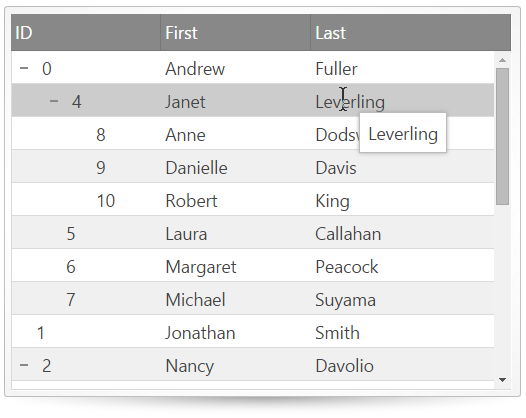
igTreeGrid は、ツールチップの機能を含みます。ユーザーがマウス ポインターをグリッド セルの上にホバーするときに、ツールチップが表示されます。ツールチップの期間および表示オプションを構成できます。この API のクラス、オプション、イベント、メソッドおよびテーマに関する詳細は、上記の関連するタブを参照してください。
この API を使用して作業を開始するための情報はここをクリックしてください。igGrid コントロールの必要なスクリプトおよびテーマを参照する方法については、 「Ignite UI で JavaScript リソースを使用する」および「Ignite UI のスタイル設定とテーマ」を参照してください。
コード サンプル
        <!DOCTYPE html>
        <html>
        <head>
            <!-- Infragistics Combined CSS -->
            <link href="css/themes/infragistics/infragistics.theme.css" rel="stylesheet" type="text/css" />
            <link href="css/structure/infragistics.css" rel="stylesheet" type="text/css" />

            <!-- jQuery Core -->
            <script src="js/jquery.js" type="text/javascript"></script>

            <!-- jQuery UI -->
            <script src="js/jquery-ui.js" type="text/javascript"></script>

            <!-- Infragistics Combined Scripts -->
            <script src="js/infragistics.core.js" type="text/javascript"></script>
            <script src="js/infragistics.lob.js" type="text/javascript"></script>

            <script type="text/javascript">
                var employees = [
                    { "employeeId": 0, "supervisorId": -1, "firstName": "Andrew", "lastName": "Fuller" },
                    { "employeeId": 1, "supervisorId": -1, "firstName": "Jonathan", "lastName": "Smith" },
                    { "employeeId": 2, "supervisorId": -1, "firstName": "Nancy", "lastName": "Davolio" },
                    { "employeeId": 3, "supervisorId": -1, "firstName": "Steven", "lastName": "Buchanan" },

                    // Andrew Fuller's direct reports
                    { "employeeId": 4, "supervisorId": 0, "firstName": "Janet", "lastName": "Leverling" },
                    { "employeeId": 5, "supervisorId": 0, "firstName": "Laura", "lastName": "Callahan" },
                    { "employeeId": 6, "supervisorId": 0, "firstName": "Margaret", "lastName": "Peacock" },
                    { "employeeId": 7, "supervisorId": 0, "firstName": "Michael", "lastName": "Suyama" },

                    // Janet Leverling's direct reports
                    { "employeeId": 8, "supervisorId": 4, "firstName": "Anne", "lastName": "Dodsworth" },
                    { "employeeId": 9, "supervisorId": 4, "firstName": "Danielle", "lastName": "Davis" },
                    { "employeeId": 10, "supervisorId": 4, "firstName": "Robert", "lastName": "King" },

                    // Nancy Davolio's direct reports
                    { "employeeId": 11, "supervisorId": 2, "firstName": "Peter", "lastName": "Lewis" },
                    { "employeeId": 12, "supervisorId": 2, "firstName": "Ryder", "lastName": "Zenaida" },
                    { "employeeId": 13, "supervisorId": 2, "firstName": "Wang", "lastName": "Mercedes" },

                    // Steve Buchanan's direct reports
                    { "employeeId": 14, "supervisorId": 3, "firstName": "Theodore", "lastName": "Zia" },
                    { "employeeId": 15, "supervisorId": 3, "firstName": "Lacota", "lastName": "Mufutau" },

                    // Lacota Mufutau's direct reports
                    { "employeeId": 16, "supervisorId": 15, "firstName": "Jin", "lastName": "Elliott" },
                    { "employeeId": 17, "supervisorId": 15, "firstName": "Armand", "lastName": "Ross" },
                    { "employeeId": 18, "supervisorId": 15, "firstName": "Dane", "lastName": "Rodriquez" },

                    // Dane Rodriquez's direct reports
                    { "employeeId": 19, "supervisorId": 18, "firstName": "Declan", "lastName": "Lester" },
                    { "employeeId": 20, "supervisorId": 18, "firstName": "Bernard", "lastName": "Jarvis" },

                    // Bernard Jarvis' direct report
                    { "employeeId": 21, "supervisorId": 20, "firstName": "Jeremy", "lastName": "Donaldson" }
                ];

               $(function () {
                   $("#treegrid").igTreeGrid({
                       dataSource: employees,
                       primaryKey: "employeeId",
                       foreignKey: "supervisorId",
                       autoGenerateColumns: false,
                       columns: [
                           { headerText: "ID", key: "employeeId", width: "150px", dataType: "number" },
                           { headerText: "First", key: "firstName", width: "150px", dataType: "string" },
                           { headerText: "Last", key: "lastName", width: "150px", dataType: "string" }
                       ],
                       features: [
                           {
                               name: "Tooltips",
                               columnSettings: [
                                   { columnKey: "employeeId", allowTooltips: false },
                                   { columnKey: "firstName", allowTooltips: true },
                                   { columnKey: "lastName", allowTooltips: true }
                               ],
                               visibility: "always",
                               showDelay: 1000,
                               hideDelay: 500
                           }
                       ]
                   });
               });
            </script>
        </head>
        <body>
            <table id="treegrid"></table>
        </body>
        </html>
関連トピック
依存関係
-
columnSettings
継承- タイプ:
- object
- デフォルト:
- []
特定の列のカスタム ツールチップ設定 (ツールチップが有効か無効か) を指定するカスタム列設定のリスト。
コード サンプル
//Initialize $(".selector").igTreeGrid({ features: [ { name: "Tooltips", columnSettings: [ { columnKey: "Name", allowTooltips: true }, { columnKey: "BoxArt", allowTooltips: false } ] } ] }); //Get var arrayOfColumnSettings = $(".selector").igTreeGridTooltips("option", "columnSettings");-
allowTooltips
- タイプ:
- bool
- デフォルト:
- true
指定された列でのツールチップを有効または無効にします。デフォルトでは、ツールチップは各列に表示されます。注: このオプションは必須です。
コード サンプル
//Initialize $(".selector").igTreeGrid({ features: [ { name: "Tooltips", columnSettings: [ { columnKey: "Name", allowTooltips: true }, ] } ] }); //Get var tooltipsSettings = $(".selector").igTreeGridTooltips("option", "columnSettings"); var allowTooltipFirstColumn = tooltipsSettings[0].allowResizing; //Set //get the array of column settings var tooltipsSettings = $(".selector").igTreeGridTooltips("option", "columnSettings"); //set new value for the first column tooltipsSettings[0].allowTooltips = false; $(".selector").igTreeGridTooltips("option", "columnSettings", tooltipsSettings); -
columnIndex
- タイプ:
- number
- デフォルト:
- -1
すべての列設定にキーまたはインデックスのどちらかを設定する必要があります。
コード サンプル
//Initialize $(".selector").igTreeGrid({ features: [ { name: "Tooltips", columnSettings: [ { columnIndex: 0, allowTooltips: true }, ] } ] }); -
columnKey
- タイプ:
- string
- デフォルト:
- null
すべての列設定にキーまたはインデックスのどちらかを設定する必要があります。
コード サンプル
//Initialize $(".selector").igTreeGrid({ features: [ { name: "Tooltips", columnSettings: [ { columnKey: "Name", allowTooltips: true }, ] } ] }); -
maxWidth
- タイプ:
- number
- デフォルト:
- null
指定した列で表示される場合、ツールチップの最大幅 (ピクセル単位) を指定します。設定されない場合、列の幅は使用されます。
コード サンプル
						//Initialize
						$(".selector").igTreeGrid({
							features: [
								{
									name: "Tooltips",
									columnSettings: [
										{ columnKey: "Name", maxWidth: 200 }
									]
								}
							]
						});
-
cursorLeftOffset
継承- タイプ:
- number
- デフォルト:
- 10
マウス カーソルに対してツールチップの左の位置を設定します。
コード サンプル
//Initialize $(".selector").igTreeGrid({ features: [ { name: "Tooltips", cursorLeftOffset: 30 } ] }); //Get var accessibility = $(".selector").igTreeGridTooltips("option", "cursorLeftOffset"); //Set $(".selector").igTreeGridTooltips("option", "cursorLeftOffset", 30); -
cursorTopOffset
継承- タイプ:
- number
- デフォルト:
- 15
マウス カーソルに対してツールチップの上の位置を設定します。
コード サンプル
//Initialize $(".selector").igTreeGrid({ features: [ { name: "Tooltips", cursorTopOffset: 50 } ] }); //Get var accessibility = $(".selector").igTreeGridTooltips("option", "cursorTopOffset"); //Set $(".selector").igTreeGridTooltips("option", "cursorTopOffset", 50); -
fadeTimespan
継承- タイプ:
- number
- デフォルト:
- 150
表示/非表示のときの、ツールチップのフェードインとフェードアウト時間を設定します。
コード サンプル
//Initialize $(".selector").igTreeGrid({ features: [ { name: "Tooltips", fadeTimespan: 300 } ] }); //Get var accessibility = $(".selector").igTreeGridTooltips("option", "fadeTimespan"); //Set $(".selector").igTreeGridTooltips("option", "fadeTimespan", 300); -
hideDelay
継承- タイプ:
- number
- デフォルト:
- 300
Type="integer" マウス カーソルがセル以外に移動した後にツールチップが
非表示するまでの時間 (ミリ秒)。コード サンプル
//Initialize $(".selector").igTreeGrid({ features: [ { name: "Tooltips", hideDelay: 1000 } ] }); //Get var accessibility = $(".selector").igTreeGridTooltips("option", "hideDelay"); //Set $(".selector").igTreeGridTooltips("option", "hideDelay", 1000); -
showDelay
継承- タイプ:
- number
- デフォルト:
- 500
マウス カーソルがセルの上にホバーした後にツールチップを
表示するまでの時間 (ミリ秒)。コード サンプル
//Initialize $(".selector").igTreeGrid({ features: [ { name: "Tooltips", showDelay: 2000 } ] }); //Get var accessibility = $(".selector").igTreeGridTooltips("option", "showDelay"); //Set $(".selector").igTreeGridTooltips("option", "showDelay", 2000); -
style
継承- タイプ:
- enumeration
- デフォルト:
- tooltip
ツールチップのスタイルを設定します。
メンバー
- tooltip
- タイプ:string
- ツールチップはマウス カーソルに基づいて配置されます。ツールチップのコンテンツをプレーン テキストとして描画します。
- popover
- タイプ:string
- ツールチップはターゲット要素に基づいて配置されます。矢印は要素にポイントします。このスタイルはタッチ対応の環境に適切です。ツールチップのコンテンツを HTML として描画します。
コード サンプル
//Initialize $(".selector").igTreeGrid({ features: [ { name: "Tooltips", style: "popover" } ] }); //Get var style = $(".selector").igTreeGridTooltips("option", "style"); //Set $(".selector").igTreeGridTooltips("option", "style", "popover"); -
visibility
継承- タイプ:
- enumeration
- デフォルト:
- overflow
ツールチップの表示状態オプションを決定します。
メンバー
- always
- タイプ:string
- ツールチップはホバーされる要素で常に表示します。
- never
- タイプ:string
- ツールチップは自動的に表示しません。
- overflow
- タイプ:string
- ツールチップは基データがそのコンテナーをオーバーフローしたときのみ表示します。
コード サンプル
				//Initialize
				$(".selector").igTreeGrid({
					features: [
						{
							name: "Tooltips",
							visibility: "always"
						}
					]
				});
				//Get
				var accessibility = $(".selector").igTreeGridTooltips("option", "visibility");
				//Set
				$(".selector").igTreeGridTooltips("option", "visibility", "always");
Ignite UI コントロール イベントの詳細については、
Ignite UI でイベントを使用するを参照してください。
-
tooltipHidden
継承- キャンセル可能:
- false
ツールチップが非表示になった後に発生するイベント。
-
evtタイプ: Event
jQuery イベント オブジェクト。
-
argsタイプ: Object
-
ownerタイプ: Object
ウィジェットへの参照を取得します。
-
tooltipタイプ: String
ツールチップに表示される文字列を取得します。
-
valueタイプ: Object
ツールチップに表示されたセルの値を取得します。
-
elementタイプ: jQuery
ツールチップに表示されたセルへの参照を取得します。
-
indexタイプ: Number
ツールチップに表示されたセルの行インデックスを取得します。
-
columnKeyタイプ: String
ツールチップに表示されたセルの列キーを取得します。
-
columnIndexタイプ: Number
ツールチップに表示されたセルの列インデックスを取得します。
-
コード サンプル
//Initialize $(".selector").igTreeGrid({ features : [ { name: "Tooltips", tooltipHidden : function(evt, args) {...} } ] }); //Bind after initialization $(document).on("igtreegridtooltipstooltiphidden", ".selector", function (evt, args) { //return the triggered event evt; // get a reference to the widget args.owner; // get the string displayed in the tooltip args.tooltip; // get the value of the cell the tooltip was displayed for args.value; // get a reference to the cell the tooltip was displayed for args.element; // get the row index of the cell the tooltip was displayed for args.index; // get the column key of the cell the tooltip was displayed for args.columnKey; // get the column index of the cell the tooltip was displayed for args.columnIndex; } ); -
tooltipHiding
継承- キャンセル可能:
- true
マウスが要素から離れ、ツールチップが非表示になるときに発生するイベント。
-
evtタイプ: Event
jQuery イベント オブジェクト。
-
argsタイプ: Object
-
ownerタイプ: Object
ウィジェットへの参照を取得します。
-
tooltipタイプ: String
ツールチップに表示される文字列を取得します。
-
valueタイプ: Object
ツールチップに表示されたセルの値を取得します。
-
elementタイプ: jQuery
ツールチップに表示されたセルへの参照を取得します。
-
indexタイプ: Number
ツールチップに表示されたセルの行インデックスを取得します。
-
columnKeyタイプ: String
ツールチップに表示されたセルの列キーを取得します。
-
columnIndexタイプ: Number
ツールチップに表示されたセルの列インデックスを取得します。
-
コード サンプル
//Initialize $(".selector").igTreeGrid({ features : [ { name: "Tooltips", tooltipHiding : function(evt, args) {...} } ] }); //Bind after initialization $(document).on("igtreegridtooltipstooltiphidding", ".selector", function (evt, args) { //return the triggered event evt; // get a reference to the widget args.owner; // get the string displayed in the tooltip args.tooltip; // get the value of the cell the tooltip was displayed for args.value; // get a reference to the cell the tooltip was displayed for args.element; // get the row index of the cell the tooltip was displayed for args.index; // get the column key of the cell the tooltip was displayed for args.columnKey; // get the column index of the cell the tooltip was displayed for args.columnIndex; } ); -
tooltipShowing
継承- キャンセル可能:
- true
ツールチップを表示するためにマウスが十分な期間要素上をホバーしたときに発生するイベント。
-
evtタイプ: Event
jQuery イベント オブジェクト。
-
argsタイプ: Object
-
ownerタイプ: Object
ウィジェットへの参照を取得します。
-
tooltipタイプ: String
ツールチップに表示される文字列を取得します。
-
valueタイプ: Object
ツールチップに表示されたセルの値を取得します。
-
elementタイプ: jQuery
ツールチップに表示されたセルへの参照を取得します。
-
indexタイプ: Number
ツールチップに表示されたセルの行インデックスを取得します。
-
columnKeyタイプ: String
ツールチップに表示されたセルの列キーを取得します。
-
columnIndexタイプ: Number
ツールチップに表示されたセルの列インデックスを取得します。
-
コード サンプル
//Initialize $(".selector").igTreeGrid({ features : [ { name: "Tooltips", tooltipShowing : function(evt, args) {...} } ] }); //Bind after initialization $(document).on("igtreegridtooltipstooltipshowing", ".selector", function (evt, args) { //return the triggered event evt; // get a reference to the widget args.owner; // get the string displayed in the tooltip args.tooltip; // get the value of the cell the tooltip was displayed for args.value; // get a reference to the cell the tooltip was displayed for args.element; // get the row index of the cell the tooltip was displayed for args.index; // get the column key of the cell the tooltip was displayed for args.columnKey; // get the column index of the cell the tooltip was displayed for args.columnIndex; } ); -
tooltipShown
継承- キャンセル可能:
- false
ツールチップが表示された後に発生するイベント。
-
evtタイプ: Event
jQuery イベント オブジェクト。
-
argsタイプ: Object
-
ownerタイプ: Object
ウィジェットへの参照を取得します。
-
tooltipタイプ: String
ツールチップに表示される文字列を取得します。
-
valueタイプ: Object
ツールチップに表示されたセルの値を取得します。
-
elementタイプ: jQuery
ツールチップに表示されたセルへの参照を取得します。
-
indexタイプ: Number
ツールチップに表示されたセルの行インデックスを取得します。
-
columnKeyタイプ: String
ツールチップに表示されたセルの列キーを取得します。
-
columnIndexタイプ: Number
ツールチップに表示されたセルの列インデックスを取得します。
-
コード サンプル
				//Initialize
				$(".selector").igTreeGrid({
					features : [
						{
							name: "Tooltips",
							tooltipShown : function(evt, args) {...}
						}
					]
				});

				//Bind after initialization
				$(document).on("igtreegridtooltipstooltipshown", ".selector", function (evt, args) {
					//return the triggered event
					evt;

					// get a reference to the widget
					args.owner;

					// get the string displayed in the tooltip
					args.tooltip;

					// get the value of the cell the tooltip was displayed for
					args.value;

					// get a reference to the cell the tooltip was displayed for
					args.element;

					// get the row index of the cell the tooltip was displayed for
					args.index;

					// get the column key of the cell the tooltip was displayed for
					args.columnKey;

					// get the column index of the cell the tooltip was displayed for
					args.columnIndex;
				} );
-
destroy
- .igTreeGridTooltips( "destroy" );
ツールチップ ウィジェットを破棄します。
コード サンプル
$(".selector").igTreeGridTooltips("destroy"); -
id
継承- .igTreeGridTooltips( "id" );
- 返却型:
- string
ルーラーとツールチップ コンテナーを抑制する親 div 要素の ID を返します。
コード サンプル
$(".selector").igTreeGridTooltips("id");
-
ui-iggrid-tooltip
- ツールチップ ウィジェットに適用されるクラス。
-
ui-iggrid-tooltip-content
- ツールチップ コンテナーに適用されるクラス。