

ui.igTreeGridResizing
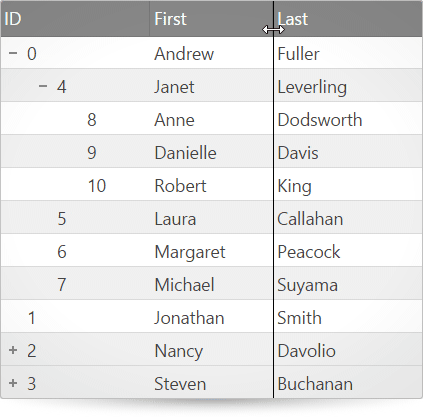
igTreeGrid は列のサイズ変更機能があります。ユーザーは、列の幅を任意に調整するかまたは列の右境界線をダブルクリックして列内の最も長い文字列の幅に展開するかを選択できます。この API のクラス、オプション、イベント、メソッドおよびテーマに関する詳細は、上記の関連するタブを参照してください。
以下のコード スニペットは、igTreeGrid コントロールを初期化する方法を示します。
この API を使用して作業を開始するための情報はここをクリックしてください。igGrid コントロールの必要なスクリプトおよびテーマを参照する方法については、「Ignite UI で JavaScript リソースを使用する」および「Ignite UI のスタイル設定とテーマ」を参照してください。コード サンプル
        <!doctype html>
        <html>
        <head>
            <!-- Infragistics Combined CSS -->
            <link href="css/themes/infragistics/infragistics.theme.css" rel="stylesheet" type="text/css" />
            <link href="css/structure/infragistics.css" rel="stylesheet" type="text/css" />

            <!-- jQuery Core -->
            <script src="js/jquery.js" type="text/javascript"></script>

            <!-- jQuery UI -->
            <script src="js/jquery-ui.js" type="text/javascript"></script>

            <!-- Infragistics Combined Scripts -->
            <script src="js/infragistics.core.js" type="text/javascript"></script>
            <script src="js/infragistics.lob.js" type="text/javascript"></script>

            <script type="text/javascript">
                var employees = [
                    { "employeeId": 0, "supervisorId": -1, "firstName": "Andrew", "lastName": "Fuller" },
                    { "employeeId": 1, "supervisorId": -1, "firstName": "Jonathan", "lastName": "Smith" },
                    { "employeeId": 2, "supervisorId": -1, "firstName": "Nancy", "lastName": "Davolio" },
                    { "employeeId": 3, "supervisorId": -1, "firstName": "Steven", "lastName": "Buchanan" },

                    // Andrew Fuller's direct reports
                    { "employeeId": 4, "supervisorId": 0, "firstName": "Janet", "lastName": "Leverling" },
                    { "employeeId": 5, "supervisorId": 0, "firstName": "Laura", "lastName": "Callahan" },
                    { "employeeId": 6, "supervisorId": 0, "firstName": "Margaret", "lastName": "Peacock" },
                    { "employeeId": 7, "supervisorId": 0, "firstName": "Michael", "lastName": "Suyama" },

                    // Janet Leverling's direct reports
                    { "employeeId": 8, "supervisorId": 4, "firstName": "Anne", "lastName": "Dodsworth" },
                    { "employeeId": 9, "supervisorId": 4, "firstName": "Danielle", "lastName": "Davis" },
                    { "employeeId": 10, "supervisorId": 4, "firstName": "Robert", "lastName": "King" },

                    // Nancy Davolio's direct reports
                    { "employeeId": 11, "supervisorId": 2, "firstName": "Peter", "lastName": "Lewis" },
                    { "employeeId": 12, "supervisorId": 2, "firstName": "Ryder", "lastName": "Zenaida" },
                    { "employeeId": 13, "supervisorId": 2, "firstName": "Wang", "lastName": "Mercedes" },

                    // Steve Buchanan's direct reports
                    { "employeeId": 14, "supervisorId": 3, "firstName": "Theodore", "lastName": "Zia" },
                    { "employeeId": 15, "supervisorId": 3, "firstName": "Lacota", "lastName": "Mufutau" },

                    // Lacota Mufutau's direct reports
                    { "employeeId": 16, "supervisorId": 15, "firstName": "Jin", "lastName": "Elliott" },
                    { "employeeId": 17, "supervisorId": 15, "firstName": "Armand", "lastName": "Ross" },
                    { "employeeId": 18, "supervisorId": 15, "firstName": "Dane", "lastName": "Rodriquez" },

                    // Dane Rodriquez's direct reports
                    { "employeeId": 19, "supervisorId": 18, "firstName": "Declan", "lastName": "Lester" },
                    { "employeeId": 20, "supervisorId": 18, "firstName": "Bernard", "lastName": "Jarvis" },

                    // Bernard Jarvis' direct report
                    { "employeeId": 21, "supervisorId": 20, "firstName": "Jeremy", "lastName": "Donaldson" }
                ];

	            $(function () {
                   $("#treegrid").igTreeGrid({
                       dataSource: employees,
                       primaryKey: "employeeId",
                       foreignKey: "supervisorId",
                       autoGenerateColumns: false,
                       columns: [
                           { headerText: "ID", key: "employeeId", width: "150px", dataType: "number" },
                           { headerText: "First", key: "firstName", width: "150px", dataType: "string" },
                           { headerText: "Last", key: "lastName", width: "150px", dataType: "string" }
                       ],
			                 features: [
				              {
					              name: "Resizing",
					              deferredResizing: false,
					              allowDoubleClickToResize: true,
					              columnSettings: [
						              { columnKey: "employeeId", allowResizing: false },
						              { columnKey: "firstName", minimumWidth: 40 }
					              ]
				              }]
                   });
               });
            </script>
        </head>
        <body>
            <table id="treegrid"></table>
        </body>
        </html>
関連サンプル
関連トピック
依存関係
-
allowDoubleClickToResize
継承- タイプ:
- bool
- デフォルト:
- true
列のサイズを、現在可視の最長セル値のサイズに変更します。
コード サンプル
//Initialize $(".selector").igTreeGrid({ features : [ { name : "Resizing", allowDoubleClickToResize: true } ] }); -
columnSettings
継承- タイプ:
- array
- デフォルト:
- []
- 要素タイプ:
- object
サイズ変更オプションを列ごとに指定する列設定のリスト。
コード サンプル
//Initialize $(".selector").igTreeGrid({ features: [ { name: "Resizing", columnSettings: [ { columnKey: "ProductID", allowResizing: true }, ] } ] });-
allowResizing
- タイプ:
- bool
- デフォルト:
- true
列のサイズ変更を有効/有効にします。
コード サンプル
//Initialize $(".selector").igTreeGrid({ features: [ { name: "Resizing", columnSettings: [ { columnIndex: 0, allowResizing: true }, ] } ] }); -
columnIndex
- タイプ:
- number
- デフォルト:
- null
列インデックス。列キーの代わりに使用できます。列設定の生成には列を常に識別子として使用することを推奨します。
コード サンプル
//Initialize $(".selector").igTreeGrid({ features: [ { name: "Resizing", columnSettings: [ { columnIndex: 0, allowResizing: true }, ] } ] }); -
columnKey
- タイプ:
- string
- デフォルト:
- null
列キー。これは、columnIndex が設定されていない場合に各列設定で必要なプロパティです。
コード サンプル
//Initialize $(".selector").igTreeGrid({ features: [ { name: "Resizing", columnSettings: [ { columnKey: "ProductID", allowResizing: true }, ] } ] }); -
maximumWidth
- タイプ:
- enumeration
- デフォルト:
- null
最大列幅 (ピクセル単位またはパーセント)。
コード サンプル
//Initialize $(".selector").igTreeGrid({ features: [ { name: "Resizing", columnSettings: [ { columnIndex: 0, maximumWidth: 100 }, ] } ] }); -
minimumWidth
- タイプ:
- enumeration
- デフォルト:
- 20
最小列幅 (ピクセル単位またはパーセント)。
コード サンプル
						//Initialize
						$(".selector").igTreeGrid({
							features: [
								{
									name: "Resizing",
									columnSettings: [
										{ columnIndex: 0, minimumWidth: 30 },
									]
								}
							]
						});
-
deferredResizing
継承- タイプ:
- bool
- デフォルト:
- false
ユーザーがサイズ変更を終了するか、または直ちに適用するまでサイズ変更を保留するかどうかを指定します。
コード サンプル
//Initialize $(".selector").igTreeGrid({ features : [ { name : "Resizing", deferredResizing: true } ] }); -
handleThreshold
継承- タイプ:
- number
- デフォルト:
- 5
サイズ変更可能な列ヘッダーそれぞれの右側に配置される、サイズ変更ハンドルの幅 (ピクセル単位)。
コード サンプル
				//Initialize
				$(".selector").igTreeGrid({
					features : [
						{
							name : "Resizing",
							handleThreshold: 10
						}
					]
				});
Ignite UI コントロール イベントの詳細については、
Ignite UI でイベントを使用するを参照してください。
-
columnResized
継承- キャンセル可能:
- false
サイズ変更が実行され結果が描画された後に発生するイベント。
コード サンプル
//Bind after initialization $(document).on("igtreegridresizingcolumnresized", ".selector", function (evt, ui) { //return the triggered event evt; // the index of the column that is resized ui.columnIndex; // the key of the column that is resized ui.columnKey; // the width of the column before resizing is done ui.originalWidth; // the width of the column after resizing is done ui.newWidth; // reference to the igTreeGridResizing widget ui.owner; }); //Initialize $(".selector").igTreeGrid({ features : [ { name : "Resizing", columnResized: function(evt, ui){ ... } } ] }); -
columnResizing
継承- キャンセル可能:
- true
サイズ変更操作が実行される前に発生するイベント。
コード サンプル
//Bind after initialization $(document).on("igtreegridresizingcolumnresizing", ".selector", function (evt, ui) { //return the triggered event evt; // the index of the column that is resized ui.columnIndex; // the key of the column that is resized ui.columnKey; // the current column width, during resizing ui.desiredWidth; // reference to the igTreeGridResizing widget ui.owner; }); //Initialize $(".selector").igTreeGrid({ features : [ { name : "Resizing", columnResizing: function(evt, ui){ ... } } ] }); -
columnResizingRefused
継承- キャンセル可能:
- false
columnFixing が有効な場合、固定されていない領域の幅が minimalVisibleAreaWidth (columnFixing で定義されるオプション) より小さくなるために固定領域で列をサイズ変更するときに発生するイベント。
コード サンプル
				//Bind after initialization
				$(document).on("igtreegridresizingcolumnresizingrefused", ".selector", function (evt, ui) {
					//return the triggered event
					evt;

					// the index of the column that is resized
					ui.columnIndex;

					// the key of the column that is resized
					ui.columnKey;

					// get the desired width(before min/max coercion) for the resized column
					ui.desiredWidth;

					// reference to the igTreeGridResizing widget
					ui.owner;

					// get the reference to the igTreeGrid widget
					ui.owner.grid
				});

				//Initialize
				$(".selector").igTreeGrid({
					features : [
						{
							name : "Resizing",
							columnResizingRefused: function(evt, ui){ ... }
						}
					]
				});
-
destroy
- .igTreeGridResizing( "destroy" );
コード サンプル
$(".selector").igTreeGridResizing("destroy"); -
resize
継承- .igTreeGridResizing( "resize", column:object, [width:object] );
ピクセル単位で指定した幅に列をサイズ変更します。幅が指定されていない場合は自動的にサイズ変更します。
- column
- タイプ:object
- 列の識別子。数が与えられた場合、columnIndex として使用され、文字列が与えられた場合、columnKey として使用されます。
- width
- タイプ:object
- オプション
- 列幅 (ピクセルまたはパーセント)。幅が指定されていない場合、列はその中にあるデータの幅に自動調整されます。
コード サンプル
$(".selector").igTreeGridResizing("resize", 0, 50);
-
ui-iggrid-resize-line
- サイズ変更中に可視の、サイズ変更行に適用されるクラス。
-
ui-iggrid-resizing-handle
- サイズ変更ハンドルに適用されるクラス。
-
ui-iggrid-resizing-handle-cursor
- カーソルを変更するためのサイズ変更ハンドルおよび本体に適用されるクラス。