

mobile.igListViewLoadOnDemand
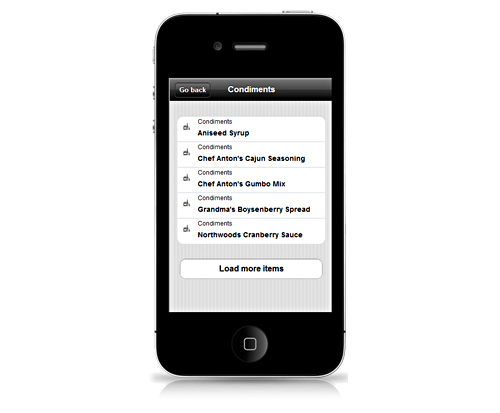
igListView コントロールは、フラット データでロードオンデマンドを提供します。ユーザーがボタンを押すと、その他の項目を読み込みます。ロードオンデマンドは、ローカル コンテキストまたはリモート (サーバー) に構成できます。igListView コントロールは、標準 jQuery 初期化とともにマークアップ ベース初期化と構成を使用する jQuery Mobile アプローチを順守します。igListView コントロールの HTML data-* 属性の詳細については、igListView データ属性リファレンスを参照してください。
以下のコードは、フィルタリング機能が有効な igListView コントロールの初期化方法を示します。
この API を使用した作業方法の詳細についてはここをクリックしてください。igList コントロールに必要なスクリプトおよびテーマの参照方法については、 Ignite UI for jQuery での JavaScript リソースの使用および Ignite UI for jQuery のスタイルとテーマの設定を参照してください。コード サンプル
        <!doctype html>
        <html>
        <head>
            <!-- jQuery Mobile Styles -->
            <link rel="stylesheet" href="../content/jqm/jquery.mobile.structure.min.css" />
            <!-- jQuery Core -->
            <script type="text/javascript" src="js/jquery.js"></script>
            <!-- jQuery Mobile Core -->
            <script type="text/javascript" src="js/jquery.mobile.js"><script>
            <!-- Infragistics mobile loader -->
            <script type="text/javascript" src="js/infragistics.mobile.loader.js"></script>
            <script type="text/javascript">
                var northwindEmployees = [
                    { "ID": 1, "Name": "Davolio, Nancy", "Title": "Sales Representative", "ImageUrl": "../content/images/nw/employees/1.png", "Phone": "(206) 555-9857", "PhoneUrl": "tel:(206) 555-9857" },
                    { "ID": 2, "Name": "Fuller, Andrew", "Title": "Vice President, Sales", "ImageUrl": "../content/images/nw/employees/2.png", "Phone": "(206) 555-9482", "PhoneUrl": "tel:(206) 555-9482" },
                    { "ID": 3, "Name": "Leverling, Janet", "Title": "Sales Representative", "ImageUrl": "../content/images/nw/employees/3.png", "Phone": "(206) 555-3412", "PhoneUrl": "tel:(206) 555-3412" },
                    { "ID": 4, "Name": "Peacock, Margaret", "Title": "Sales Representative", "ImageUrl": "../content/images/nw/employees/4.png", "Phone": "(206) 555-8122", "PhoneUrl": "tel:(206) 555-8122" },
                    { "ID": 5, "Name": "Buchanan, Steven", "Title": "Sales Manager", "ImageUrl": "../content/images/nw/employees/5.png", "Phone": "(71) 555-4848", "PhoneUrl": "tel:(71) 555-4848" },
                    { "ID": 6, "Name": "Suyama, Michael", "Title": "Sales Representative", "ImageUrl": "../content/images/nw/employees/6.png", "Phone": "(71) 555-7773", "PhoneUrl": "tel:(71) 555-7773" },
                    { "ID": 7, "Name": "King, Robert", "Title": "Sales Representative", "ImageUrl": "../content/images/nw/employees/7.png", "Phone": "(71) 555-5598", "PhoneUrl": "tel:(71) 555-5598" },
                    { "ID": 8, "Name": "Callahan, Laura", "Title": "Inside Sales Coordinator", "ImageUrl": "../content/images/nw/employees/8.png", "Phone": "(206) 555-1189", "PhoneUrl": "tel:(206) 555-1189" },
                    { "ID": 9, "Name": "Dodsworth, Anne", "Title": "Sales Representative", "ImageUrl": "../content/images/nw/employees/9.png", "Phone": "(71) 555-4444", "PhoneUrl": "tel:(71) 555-4444" }
                ];
            </script>
            <script type="text/javascript">
                $.ig.loader({
                    scriptPath: "js",
                    cssPath: "css",
                    resources: "igmList.LoadOnDemand",
                    theme: "ios"
                });
            </script>
        </head>
        <body>
            <ul id="contactsListView"
                data-role="iglistview"
                data-icon-mode="thumbnail"
                data-data-source="northwindEmployees"
                data-bindings-header-key="Name"
                data-bindings-primary-key="ID"
                data-bindings-text-key="Phone"
                data-bindings-image-url-key="ImageUrl"
                data-load-on-demand="true"
                data-load-on-demand-type="local"
                data-load-on-demand-page-size="4">
            </ul>
        </body>
        </html>
関連サンプル
関連トピック
依存関係
-
autoHideButtonAtEnd
- タイプ:
- bool
- デフォルト:
- true
True の場合、残っているページはなく (データ ソースによれば)、[その他の項目を読み込む] ボタンと自動読み込みは停止します。
コード サンプル
//Initialize $(".selector").igListView({ features: [ { name: "LoadOnDemand", autoHideButtonAtEnd: true } ] }); //Get var autoHideButton = $(".selector").igListViewLoadOnDemand("option", "autoHideButtonAtEnd"); -
loadButtonTheme
- タイプ:
- string
- デフォルト:
- null
更にボタンを読み込むために適用するテーマを示します。デフォルトでは、null の場合、ページから継承します。
-
mode
- タイプ:
- enumeration
- デフォルト:
- button
追加小目をロードするためのボタンを表示するか、自動的にフェッチするかを定義します。
メンバー
- automatic
- タイプ:string
- button
- タイプ:string
コード サンプル
//Initialize $(".selector").igListView({ features: [ { name: "LoadOnDemand", mode: "automatic" } ] }); //Get var mode = $(".selector").igListViewLoadOnDemand("option", "mode"); -
pageIndexUrlKey
- タイプ:
- string
- デフォルト:
- null
現在要求されているページ インデックスを説明するエンコードされた URL パラメーターの名前を示します。
コード サンプル
//Initialize $(".selector").igListView({ features: [ { name: "LoadOnDemand", pageIndexUrlKey: "page" } ] }); //Get var pageIndexKey = $(".selector").igListViewLoadOnDemand("option", "pageIndexUrlKey"); -
pageSize
- タイプ:
- number
- デフォルト:
- 10
0 よりも大きい場合、最初にフェッチされて読み込まれる項目をいくつにするかを制御します。
コード サンプル
//Initialize $(".selector").igListView({ features: [ { name: "LoadOnDemand", pageSize: 5 } ] }); //Get var pageSize = $(".selector").igListViewLoadOnDemand("option", "pageSize"); -
pageSizeUrlKey
- タイプ:
- string
- デフォルト:
- null
現在要求されているページ サイズを説明するエンコードされた URL パラメーターの名前を示します。
コード サンプル
//Initialize $(".selector").igListView({ features: [ { name: "LoadOnDemand", pageSizeUrlKey: "pageSize" } ] }); //Get var pageSizeKey = $(".selector").igListViewLoadOnDemand("option", "pageSizeUrlKey"); -
recordCountKey
- タイプ:
- string
- デフォルト:
- null
データ ソース内のレコードの総数を保持する応答内のプロパティ。
コード サンプル
//Initialize $(".selector").igListView({ features: [ { name: "LoadOnDemand", recordCountKey: "count" } ] }); //Get var recordCountKey = $(".selector").igListViewLoadOnDemand("option", "recordCountKey"); -
type
- タイプ:
- enumeration
- デフォルト:
- null
ローカルまたはリモート並べ替えを定義。
メンバー
- remote
- タイプ:string
- local
- タイプ:string
コード サンプル
            //Initialize
            $(".selector").igListView({
                features: [
                    {
                        name: "LoadOnDemand",
                        type: "local"
                    }
                ]
            });

            //Get
            var type = $(".selector").igListViewLoadOnDemand("option", "type");
Ignite UI コントロール イベントの詳細については、
Ignite UI でイベントを使用するを参照してください。
-
itemsRequested
- キャンセル可能:
- false
データの新しいページが dataView に追加された後に発生するイベント。
関数は引数 evt および ui を取得します。
ui.owner を使用して、igListViewLoadOnDemand への参照を取得します。
ui.owner.list を使用して、igList への参照を取得します。コード サンプル
//Delegate $(document).delegate(".selector", "iglistviewloadondemanditemsrequested", function (evt, ui) { //return reference to igListViewLoadOnDemand ui.owner; //return reference to igList ui.owner.list; }); //Initialize $(".selector").igListView({ features: [ { name: "LoadOnDemand", itemsRequested: function(evt, ui) {...} } ] }); -
itemsRequesting
- キャンセル可能:
- true
データの新しいページがフェッチ、dataView に追加される前に発生するイベント。
データの新しいページの取得をキャンセルするには、False を返します。
関数は引数 evt および ui を取得します。
ui.owner を使用して、igListViewLoadOnDemand への参照を取得します。
ui.owner.list を使用して、igList への参照を取得します。
ui.newPageIndex を使用して、データの次のページのインデックスを取得します。コード サンプル
            //Delegate
            $(document).delegate(".selector", "iglistviewloadondemanditemsrequesting", function (evt, ui) {
                //return index of the next page of data
                ui.newPageIndex
                //return reference to igListViewLoadOnDemand
                ui.owner;
                //return reference to igList
                ui.owner.list;
            });

            //Initialize
            $(".selector").igListView({
                features: [
                    {
                        name: "LoadOnDemand",
                        itemsRequesting: function(evt, ui) {...}
                    }
                ]
            });
-
destroy
- .destroy( );
igListViewLoadOnDemand 機能を破棄します。
コード サンプル
$(".selector").igListViewLoadOnDemand("destroy");
-
ui-iglist-load-more
- mode="button" の場合、[その他の項目を読み込む] ボタンに適用するクラス。